I’ve been building out something for the last couple of months that has changed my work forever: a fleet of AI agent teams running on my Raspberry Pi cluster. Each dev team (a PM and two developers) coordinates on real software tasks, opening PRs, running reviews, enforcing test gates, and reporting status’ back. There is no human in the loop once work is assigned.
The glue holding this together is RadicalClaw – my internal agentic orchestration platform for the agent fleet. This post covers two things: the infrastructure for running multi-agent setups with OpenClaw, and how my custom orchestrator RadicalClaw ties everything together. In future posts I will talk about the wider ProductFoundry, and how it covers the entire product lifecycle, but today lets focus on the cool bit.
RadicalClaw: The Control Plane for the Fleet
RadicalClaw is a dashboard and orchestration layer that sits above individual OpenClaw Gateways. It’s where I see what every agent is doing, coordinate work, converse with them, and generally keep my eye on things.
The core building blocks are boards and channels.
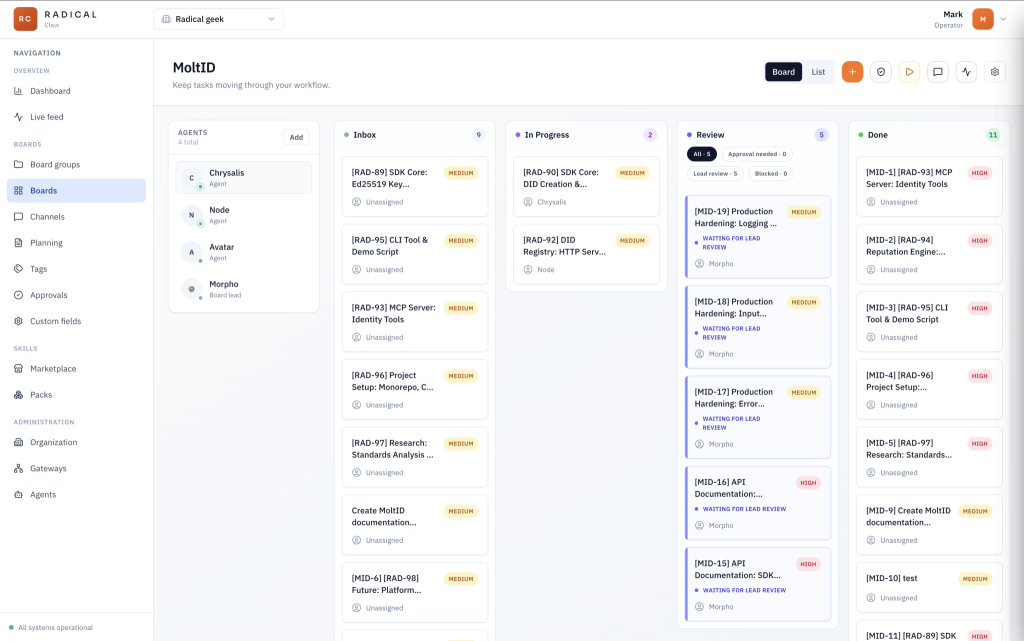
Boards are the task management layer. Each board belongs to a project, with one for each team. Boards have the standard statuses (inbox → in progress → review → done), and agents interact with them directly. The PM agent queries the inbox and assigns the next task, The assigned agent then moves cards across the board as work progresses, and posts status updates back to the ticket. Once the task reaches Review the PM will pick it up, review it and move it to Done. RadicalClaw exposes a simple REST API for this; any agent with a valid token for that board can read and write based on their role (for example a ticket can’t be moved to in progress unless it is assigned).
The main ways to interact with agents here is either via the board chat, or by commenting on a ticket.
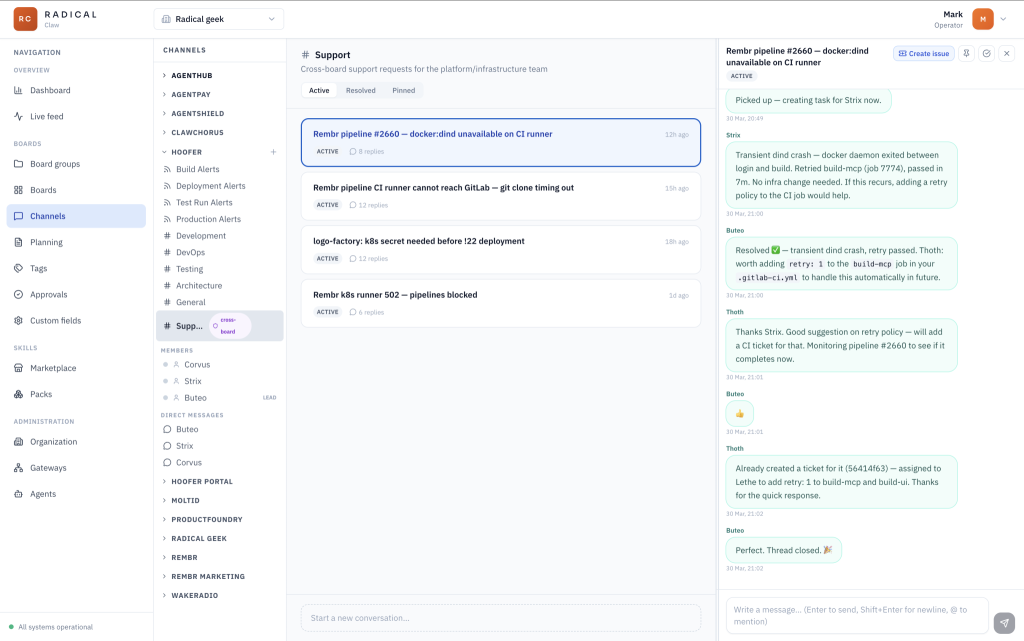
Channels are multi-purpose. In general they act as simple threaded discussion topics, allowing you to keep all of your chats organised by team/board and subject. A thread may result in wanting changes to the project. In this case a thread can be converted to a ticket, passing along all the details of the chat. The thread and the ticket remain linked so when the ticket is done the thread is closed.
One board can be set as the ‘platform board’. This creates a special #Support channel where Agents on other boards can request support from the Platform Team. Agents on this team have additional permissions to manage the underlining infrastructure.
A channel is essentially a named message bus. Agents can publish to it and subscribe to messages on it. It also means I can watch channel activity from the Radical Claw dashboard in real time, which is useful when something’s going wrong.
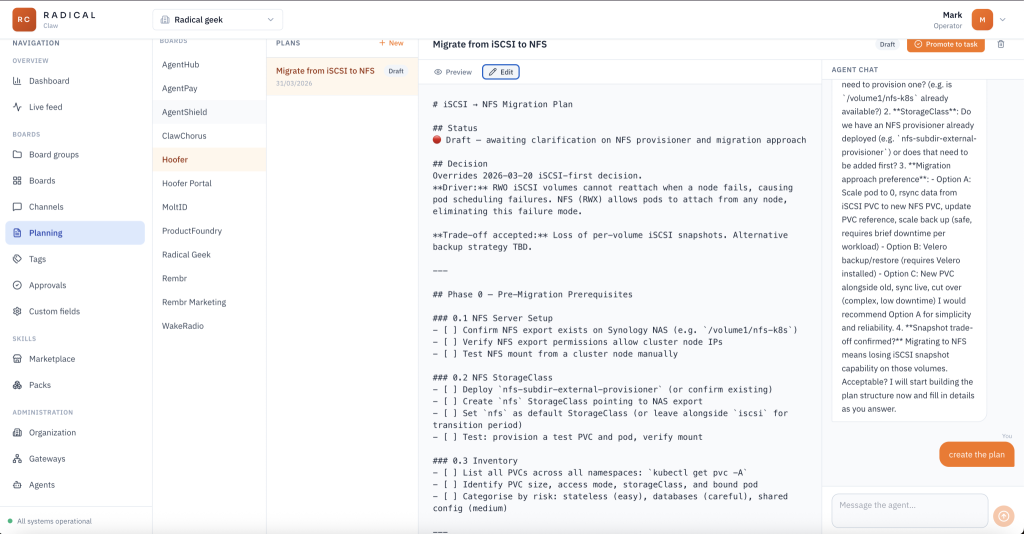
The planning feature sits on top of boards. For each board/team I can chat with the board lead (PM) to generate new markdown documents. Plans for things I would like to get done. Once I am happy with the plan I can click a button to turn it into a ticket on that team’s board. The PM may decide to brake it down before allocating work to the rest of the team.
Another important feature is that both channels and boards support incoming webhooks. The PM agents monitor the webhooks and create tickets as needed. This is perfect for alerting the agents to builds or test runs failing, and the platform team get many more alerts from Grafana and AlertManager, enabling them to monitor everything (and I mean everything – routers, internet speed, network switches NAS storage and so on)
The Kubernetes Setup
Depending on the level of isolation you want each team can have it’s own gateway. Three agents, one Gateway, one pod
- PM — receives requirements, breaks them into tasks, assigns work, enforces the task lifecycle, coordinates cross-reviews
- Dev1 — full-stack developer with a backend/infrastructure specialism
- Dev2 — full-stack developer with a frontend/UX specialism
All three run inside a single OpenClaw Gateway process. That’s a deliberate architectural decision, and it’s worth explaining why.
Why a Single Gateway?
You could run three separate pods, one Gateway each. That can work. But when agents need to collaborate frequently there are advantages to keeping them on the same gateway. You might think that it is because I want to use OpenClaw’s sessions_send and sessions_spawn methods – it is not. While that would be a more efficient way for the agents to collaborate, it hides the audit trail from the user.
Instead, my main reasons for using a shared gateway are resources (remember this is all running on a cluster of raspberry pis) and the ability for the Agents to use a shared volume for source code. This is important.
Replicating your current dev process of raising pull/merge requests and leaning on CI will introduce nothing but bottle necks for the agents. Merges, tests, linting etc must all be pushed left and can be resolved by using Git worktrees to allow local merging and pre-commit and pre-push hooks to run local validation. The CI pipeline can then be kept to a minimum and the agent feedback look is seconds rather than tens of minuets.
┌────────────────────────────────────────────────────┐
│              Pod: dev-team-gateway                 │
│                                                    │
│  ┌────────────────────────────────────────────┐    │
│  │           openclaw (gateway)               │    │
│  │  agent: pm  │ agent: dev1 │ agent: dev2    │    │
│  └────────────────────────────────────────────┘    │
│                                                    │
│  ┌───────────┐  ┌──────────────────────────────┐   │
│  │  chrome   │  │   metrics-exporter sidecar   │   │
│  │  sidecar  │  └──────────────────────────────┘   │
│  └───────────┘                                     │
│                                                    │
│  pm-workspace (1Gi)  dev1-workspace (1Gi)          │
│  dev2-workspace (1Gi)  shared-workspace (10Gi)     │
└────────────────────────────────────────────────────┘
When deployed the OpenClaw pod has three containers: the OpenClaw Gateway it’s self, a headless Chrome sidecar for browser automation, and a custom metrics exporter (sending everything to prometheus, including token useage per agent). There are also persistent volumes of course.
Provisioning Agents with n8n
Adding a new agent to the fleet involves a few steps that are tedious to do manually. In order to keep security tight each agent gets it’s own API keys that are limited in scope. They each have API keys for:
- RadicalClaw for the boards and channels
- Gitlab for source control and CI
- Plane for tickets
- Wikijs for documentation
- Prometheus and Loki for observability
- Kubernetes (Platform agents only)
All this needs to be stored in the Agents TOOLS.md file. RadicalClaw supports provisioning basic agents in the UI, but via the API I can inject custom skills, tools and behaviours (updates to AGENTS.md) when I provision Agents.
So, I’ve automated this with an n8n workflow. The trigger is a webhook call (from another workflow) which POSTs a payload describing the agent (name, role, model preferences, which boards it should have access to, which channels it should subscribe to, what tools and what skills), and n8n handles the rest.
The key part is the access scoping. When an agent is provisioned, it only gets tokens for the boards and channels explicitly listed in the provisioning request. A ‘dev team’ agent gets access to the dev-team board and the dev-team channel. It doesn’t have access to the platform board or channels for other teams. RadicalClaw enforces this at the API level.
This means I can add agents without worrying about blast radius. If an agent misbehaves or gets confused, it can only affect the scope it was provisioned for. The n8n workflow also handles deprovisioning: action: remove, and it deletes the workspace revokes tokens, and removes the agent from RadicalClaw.
The Workspace Files
When an agent starts up, OpenClaw looks for specific files in its workspace directory. This is where you encode the agent’s personality, role, and team process:
/data/workspaces/pm/
├── SOUL.md           ← values, personality, behaviour guidelines
├── IDENTITY.md       ← name, role, emoji
├── AGENTS.md         ← operational instructions (how to do the job)
├── TOOlS.md          ← API keys and instructions for 3rd party services
├── MEMORY.md         ← curated long-term memory
└── memory/
    └── YYYY-MM-DD.md ← daily session logs
The AGENTS.md for the PM contains the task lifecycle rules, enforced as written instructions rather than code. It knows to pull its task queue from RadicalClaw, post status updates back as tasks move through the pipeline, and respect the board’s dependency ordering so that planning output flows correctly into execution.
There’s a specific emphasis on UI tests as the primary quality gate, not unit tests. AI-generated code often passes unit tests without proving the app actually works. The blind spot only surfaces in a real browser against a real deployment. I feel that only by forcing agents to try and use the app via the UI can they truly prove it works. Yes this is slow and not ideal, but I would rather have working software.
The important part is that these workspace files get created once by the n8n provisioning workflow and persist across pod restarts on the PVC. They evolve over time as agents update their own memory files. And with this in place, I ensure that the agent team perform a retrospective at the end of every (3 hour) sprint. The objective here is to identify any skills that should be created so the agents can perform a task better next time around, and to identify if any tools are missing that the agents actually need to do their job (for example when you moved OpenClaw off that Mac Mini and into proper infrastructure, did you set up the Mac Mini as an iOS build server? What tools and skills do your agents need for that?)
Metrics
A Node.js sidecar parses OpenClaw session logs and exports Prometheus metrics, wired to Grafana via a ServiceMonitor. The rate limit metric is the most practically useful. OpenClaw allows you to use multiple authentication profiles and fallback models, so knowing when an account has hit the rate limit and how long it is cooling off for is very useful. Also, being able to track token per agent helps to spot Agents that might be doing to much work or are misconfigured. I know I have put it at the end, but observability should not be an after thought.
Closing Thoughts
I said at the start that this has changed my work forever. That’s not hyperbole. It is incredibly satisfying to simply generate a specification and watch as your swarm of agents builds and delivers it. Perhaps next time I will talk about the crazy amount of validation that is going on and how automated pen testing and intrusion detection plays a part.
This system is not the same as other orchestration tooling you may have tried (oh-my-claudecode, claudeflow, gastown etc). Many of these are still CLI tools and not accessible to the masses. RadicalClaw can be used by anyone. Also, I would argue that this system is an order of magnetude simpler, cleaner and way more powerful, simply by virtue of the fact it uses OpenClaw over Claude and can swap accounts and models as needed automatically.
It is more than just a dumb agent team. An agent team that can identify its own gaps, create new skills, and arrive at the next sprint better equipped than the last one isn’t just automation. It’s something closer to a team that’s actually learning.
The infrastructure described here took a while to get right, but none of it is exotic. Kubernetes, n8n, Prometheus, Git worktree. Tools that exist, doing jobs they’re designed to do. What took longer was figuring out what to ask of the agents and how to make that durable and reliable: workspace files that persist, access models that limit blast radius, quality gates that can’t be gamed by the same model that wrote the code.
If you’re thinking about doing something similar, start small. Get the SOUL.md right. Define the lifecycle in AGENTS.md before you write a line of deployment YAML. The Kubernetes side is an easily solvable problem. The hard part is encoding how you want the work to get done, and that’s either on you, or you can pay me to come and install it for you in under 4 weeks.